Consume an AX AIF Document Service from .NET

Imparted from here

This article appears in the Third Party Products and Tools section. Articles in this section are for the members only and must not be used to promote or advertise products in any way, shape or form. Please report any spam or advertising.

Introduction

This article shows how a .NET client (in our case Windows Client) can consume an AX WCF document service. For this purpose, the service will be hosted on the AOS (Application Object Server) instead of IIS.

Scope

We take the class room (course rooms) administration module as an example. We want to expose a (document) service which makes it possible for external clients to exchange data (CRUD-operations) with AX.

Steps

The remainder of the document explains the different steps to meet our goals. This post assumes that the reader has some experience with the AX AIF (Application Integration Framework) which means that next steps briefly explains the creation, deployment and consumation of an AX document service.

Step 1: Create a document query

Each document service is based on a document query stored in the AOT (Application Object Tree) in AX. This document query holds the appropriate data objects which will be exposed by the service. The datasources of the document query will be exposed by the (WCF) service which will contain the appropriate XML message schema.

Step 2: Create a document service

The wizard takes the created document query (from the previous step) as input parameter and will create a corresponding service class (details omitted). This service class hosts the different methods to invoke CRUD (Create; Read; Update; Delete) operations on the datasource (in our case Course Rooms).

Step 3: Check generated service project

The service wizard created a service project. Besides the service itself, the project contains the service query, the service document class, and the data classes which hold the actual data. What’s interesting is that the service wizard also created a job: GenerateXSDSchema_AxdEMNU_AxdHRMCourse which provides the XML that will be sent over the wire to the consuming client. When you execute the job, you will get the corresponding XML file, as shown below:

Step 4: Expose the document service as a WCF WebService

Create an (enhanced) inbound port for the service (use inbound ports for messages which originate from within AX and should be consumed by external clients). In our demo case, we will expose the service as a tcp-ip service, which will be consumable by external clients from within the scope of the intranet. (If the service should be consumable from the internet, we should choose the Http adapter instead).

Step 5: Select the appropriate service operations

Once you have created an integration port, you must select the service operations which can be invoked by the consuming client.

Step 6: Consume the exposed document service by an external (.NET) client

The service can be consumed by an external client (in our case, a .NET winforms application) … but could be any other type of application … Just below, I briefly explain the interaction code within the .NET client (code executed when the user selects the load or save button). In our demo case, we expose the find, create, update & delete methods.

Step 6.1: .NET Winforms client

The service will be consumed by a simple (C#) .NET client. The client will load the data into a datagrid, make changes to the data (CRUD operations) and submit those changes to AX.

Step 6.2: Load data in .NET client

When the users “clicks” the “Load” button, next will happen:

  • Set query criteria, in our case we will return all course rooms.
  • Set the company from which data will be loaded.
  • Call the repository GetCourseRooms() method which returns all rooms from AX.
Step 6.3: Save the changes to AX
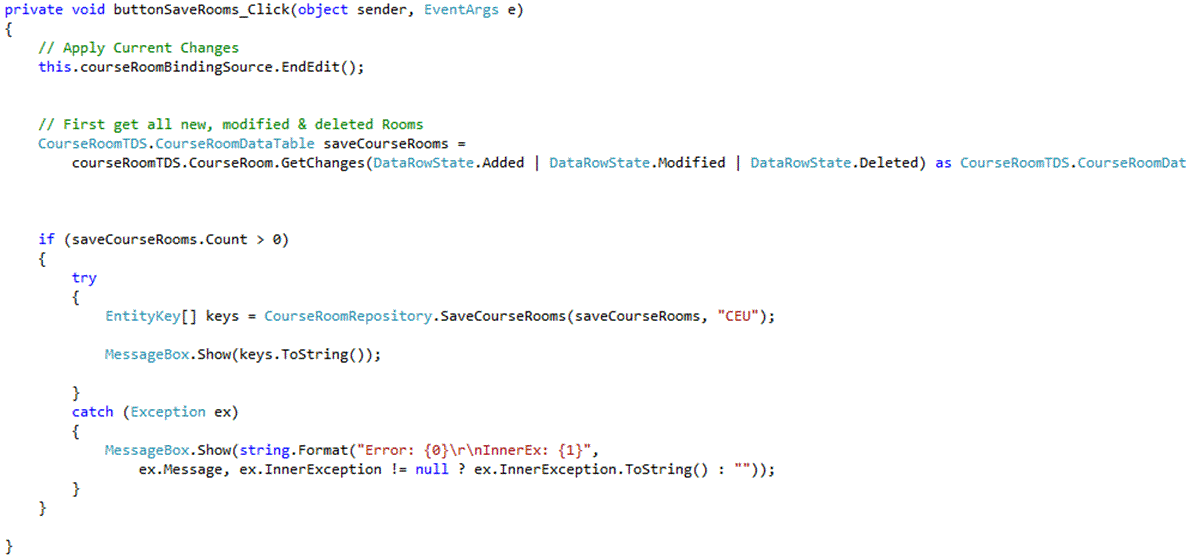
When the user “clicks” the “Save” button, next will happen:

  • Apply last changes to the current dataset (.NET DataSet holds the AX records)
  • Get all added, modified & deleted rows
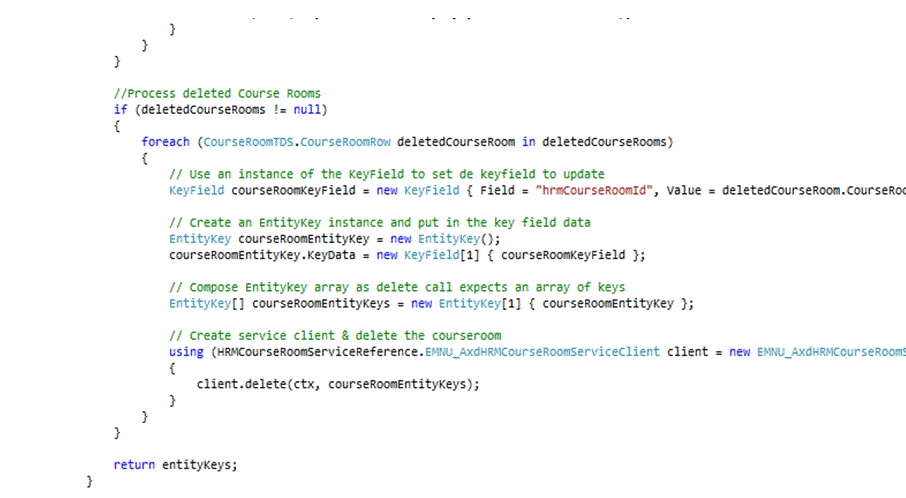
  • Call the repository SaveCourseRooms() method which will update the data to AX.
.NET Data Repository
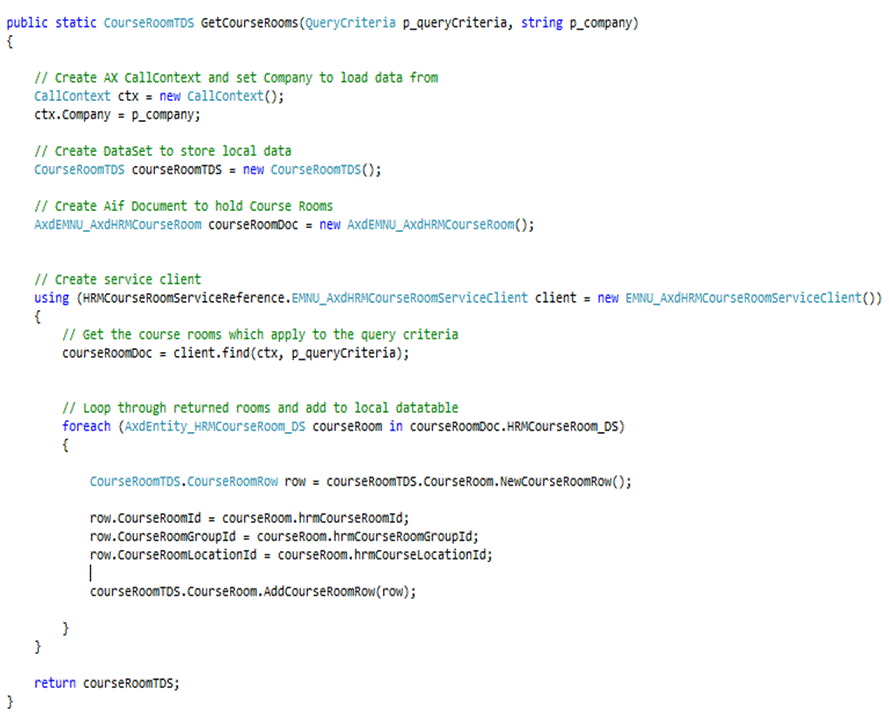
Implementing the "find" method in the repository class
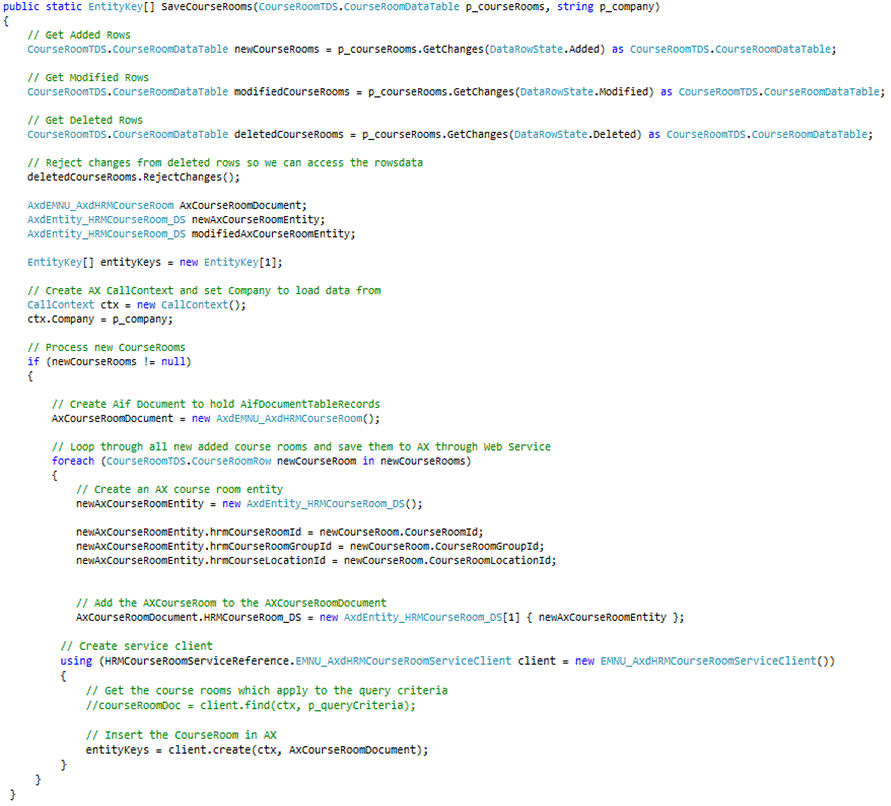
Implementing the "create, update & delete" method in the repository class
Dynamics AX 2009 Workflow does not working

I have faced a problem today at my work, the workflow does not working, and there not PR submitted and any incident is Pending.

I checked every thing and restart AOS Service  but my Issue is not fixed, so I checked Windows event log on server that host Workflow services and I got the bellow error.


Session log on for Microsoft Dynamics failed.

Dynamics Adapter LogonAs failed.

Microsoft.Dynamics.Framework.BusinessConnector.Session.Exceptions.FatalSessionException
   at Microsoft.Dynamics.Framework.BusinessConnector.Session.DynamicsSession.HandleException(String message, Exception exception, HandleExceptionCallback callback)
   at Microsoft.Dynamics.Framework.BusinessConnector.Session.DynamicsBase.HandleExceptionInternal(String message, Exception e)
   at Microsoft.Dynamics.Framework.BusinessConnector.Session.DynamicsAdapter.LogonAs(String user, String domain, NetworkCredential bcProxyCredentials, String company, String language, String objectServer, String configuration)
   at Microsoft.Dynamics.Framework.BusinessConnector.Session.DynamicsAdapter.Microsoft.Dynamics.Framework.BusinessConnector.Adapter.IAxaptaAdapter.LogonAs(String user, String domain, NetworkCredential bcProxyCredentials, String company, String language, String objectServer, String configuration)
   at Microsoft.Dynamics.Framework.Workflow.BusinessConnector.WorkflowSession.OnLogon(IAxaptaAdapter axaptaAdapter)
   at Microsoft.Dynamics.Framework.BusinessConnector.Session.DynamicsSession.Init(ICacheContext context)

Microsoft.Dynamics.BusinessConnectorNet.LogonFailedException
   at Microsoft.Dynamics.BusinessConnectorNet.Axapta.Logon(BC_PROXY_ACCOUNT_INFO* pBCProxyAccountInfo, String company, String language, String objectServer, String configuration)
   at Microsoft.Dynamics.BusinessConnectorNet.Axapta.LogonUsingBCProxyAccount(_SEC_WINNT_AUTH_IDENTITY_W* pImpersonatedUserAccount, NetworkCredential bcProxyCredentials, String company, String language, String objectServer, String configuration)
   at Microsoft.Dynamics.BusinessConnectorNet.Axapta.LogonAs(String user, String domain, NetworkCredential bcProxyCredentials, String company, String language, String objectServer, String configuration)
   at Microsoft.Dynamics.Framework.BusinessConnector.Session.DynamicsAdapter.LogonAs(String user, String domain, NetworkCredential bcProxyCredentials, String company, String language, String objectServer, String configuration)

Solution:

Restart IIS service on the server.

Dynamics AX 2012 R2 – Cumulative Update 7 (CU7) released

Microsoft released a new cumulative update for Microsoft Dynamics AX2012 R2, named Cumulative Update 7 (KB2885603). The version number of this release is 6.2.1000.4051.

You can download the update here.

Within this update hotfixes are included as well as some new or enhanced features. Also the prior CU’s are included. It’s good to see Microsoft continues enriching the functionality for Microsoft Dynamics AX even in cumulative updates. There was an additional focus within the next areas:

Update experience

The CU7 update experience is more metadata driven – providing users the ability to view applicable changes, perform impact analysis during install and apply them to their environments on an as-needed basis with auto code update (where possible). The new update experience will also have tighter integration between Lifecycle Services in the cloud and the on premise update installer.

Sales order potency

Create and validate price calculations for sales order items that have a potency. Price calculations are based on the active concentration levels of batch attributes.

Budget planning

  • Create an Excel worksheet template using a wizard.
  • Allocate budget amounts using ledger allocation.

Payroll

Some compliance preparation reports are added for use of the 940, 941, state wage and tax reports. Also preparation reports for VETS and OSHA are available for the US market.

It is possible to create groupings of tax codes that share the same financial data. An user can act on then as group rather than individually. The new tax groups can be used in transaction posting definitions as well.

Another nice enhancement is the functionality for updating benefits rates. A process can be run that compares the default rates to the enrolled rates for each worker and makes any necessary updates. It also provides a way for the user to designate an enrolled rate as “custom” so the update tool will ignore it when processing updates.

You can now use the Payroll cube to analyze information including earnings statements, pay statements, benefit accruals, tax history, arrears, and benefits.

HRM

You can hire or promote a worker using personnel actions. These actions enables the following features:

  • The hire action is added to an action history log for the worker
  • The option to use standard Dynamics AX Workflow before the Hire is committed
  • The option to easily add comments about the hire

Depending on the personnel action type that you use, the hire action can be routed through workflow.

You can now use the HR cube to analyze workforce demographic information, recruiting metrics, compensation, benefits, training courses, seniority, positions, jobs, employment leave, terminations, and more.

On-hand cleanup

The purpose of the On-hand entries cleanup feature is to improve the performance of the on-hand query by deleting records from the inventory on-hand table (InventSum) that are closed and associated with a tracking dimension. Entries in the table that are not associated with a tracking dimension are not deleted. The feature will especially benefit companies that handle large quantities of serialized products.

Product change

Within CU7 functionality is added to document the master data changes needed to accommodate the substitution of a component used in production, and manage the coordinated release of BOMs and routes to production. This functionality is integrated with case management where product cases are routed in this process.

Services industries

It is also good to see some improvements on project functionality:

A Microsoft Project client add-in is included in this update. It enables easy creation and editing in MS Project without requiring Project Server. It supports editing WBS for project, project quotes, and templates including task and category assignment. Additionally it enables tasks to be viewed on SharePoint Online.

Enhancements on the work breakdown structure (WBS) provides a more natural and complete editing surface for project planning, estimation, and monitoring. Several enhancements have been made to provide more effective resource scheduling and assignment. These enhancements include the following abilities:

  • Assign resources using visual, graphic-based tools
  • Form a project team by identifying project roles and competencies required for the team
  • Rationalize team and work breakdown structure assignments • Assign a percentage of a worker’s capacity to a project
  • Make group resource assignments

Also enhancements were made on intercompany project invoicing. The goal of this functionality is to make the control of cost, revenue recognition, taxes, and transfer price for intercompany project transactions in Microsoft Dynamics AX Service Industries more flexible and powerful.

Mobile experiences

Until now you could install updates for enabling functionality on mobile devices such as timesheets and expenses. Within this update this functionality is included out of the box.

Data Import Export Framework

Within CU7 also the Data Import Export Framework is integrated as part of the update. Over 60 entities have been added out of the box. Some new entities are: Number sequence codes, Project contracts and Product variants.

Also the new version of this framework now supports file type XML and Excel.

You can now use a wizard to compare or copy entities from one source company to one or more companies.

Imparted from here

Top 10 issues discovered from Microsoft Dynamics AX 2012 implementations


Below headers of top 10 and details included in link below

1. Max Degree of Parallelism is not set to 1

2. No Pre-Allocation for Non Continuous Number Sequences with high consumption

3. Insufficient Auto Growth for Data and Log files

4. Processor bottleneck for Dynamics AX batch processing

5. Heavy Application database logging

6. Missing Clustered indexes

7. Wrong Index maintenance

8. Enabled debug in Production

9. Power Management set to Balanced

10. Kernel and Application are outdated and should be patched


http://blogs.msdn.com/b/axinthefield/archive/2013/06/18/top-10-issues-discovered-from-premier-field-engineer-dynamics-ax-health-check.aspx?CommentPosted=true#commentmessage